Loading IndexHaven…
Indexability
Soft 404 Errors: What They Are, Why Google Flags Them and How to Fix Every Cause
By IndexHaven Editorial · Published 2026-10-15 · Updated 2026-10-15
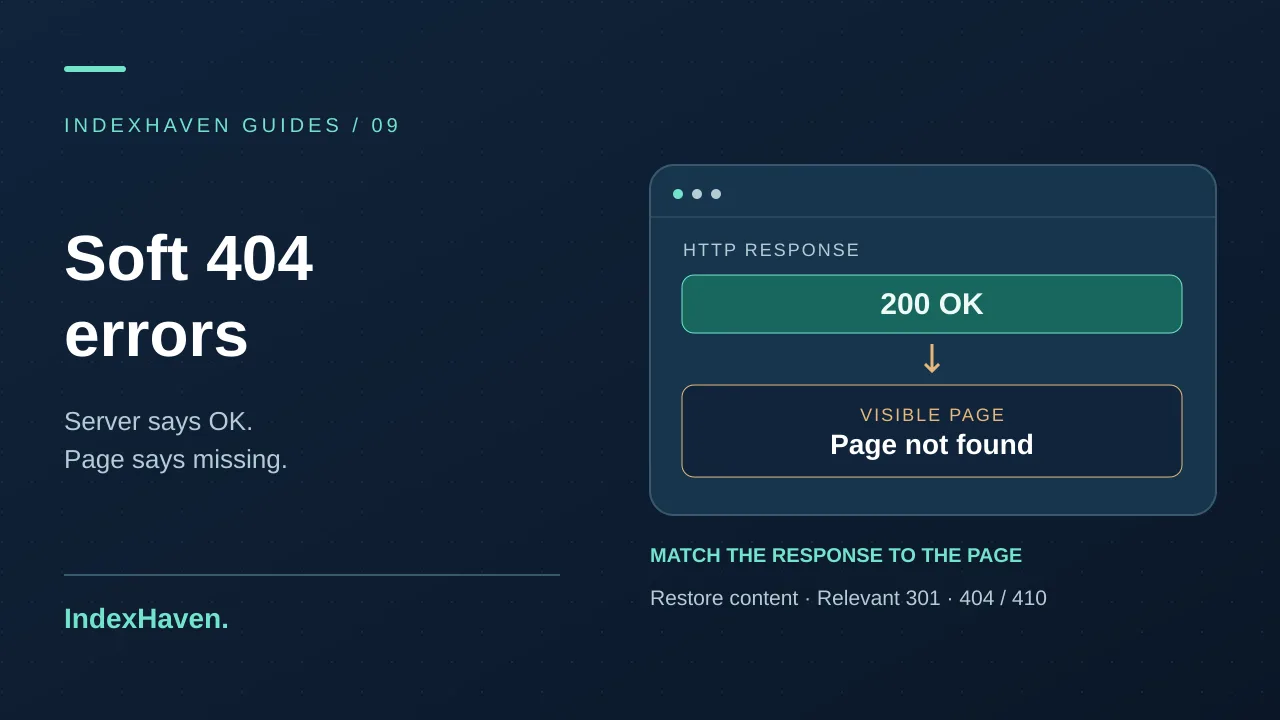
Soft 404 in Search Console? Learn what it means, the 7 real causes, how to test status codes with curl, and the right fix for each case.
In this guide
You open Search Console, click into the Page indexing report, and there it is: a growing pile of URLs labelled Soft 404. You visit a few of them. Some look like perfectly normal pages. Others are obviously empty. One or two load fine in your browser and make no sense at all. So what, exactly, is Google complaining about?
What is a soft 404 error? The short answer
A soft 404 is a page that looks like an error or an empty page to Google, but the server answers it with a normal 200 OK status code instead of a 404 or 410. Google notices the mismatch, decides the page is effectively “not found”, and keeps it out of search results. The fix depends on why the page looks empty: restore the content, redirect to a true replacement, or return a proper 404/410.
That’s the whole concept in three sentences. The rest of this guide is about the part that actually matters, which is working out which of several different causes you’re dealing with, because the correct repair is different for each one.
Why the name is confusing
Every time a browser or crawler asks your server for a URL, the server replies with a status code before it sends any content. A few you’ll see constantly:
- 200 means “here’s the page you asked for.”
- 301 means “this moved permanently, go here instead.”
- 404 means “nothing exists at this address right now.”
- 410 means “this existed once and was removed on purpose.”
A normal 404 is honest. The server says the page is missing, the page says it’s missing, and everyone agrees. A soft 404 is the opposite: the visible page says “Sorry, we couldn’t find that” (or shows an empty product grid, or a blank template) while the status code still says 200. The server is telling search engines one thing and visitors another.
Think of a shop with an “Open” sign on the door and nothing on the shelves. Customers walk in, look around, and leave. Google does the same thing, except it keeps a record of the empty shop and eventually stops sending anyone there.
Here is how the common responses compare:
200 + real content
- What the visitor sees: A useful page
- How Google reads it: A real page, eligible for indexing
- Right use: Pages that exist
200 + “not found” or empty content
- What the visitor sees: An error or blank page
- How Google reads it: Contradictory, so a soft 404
- Right use: Never intentional
404
- What the visitor sees: A helpful error page
- How Google reads it: Missing now, may come back
- Right use: Removed pages with no replacement
410
- What the visitor sees: A helpful error page
- How Google reads it: Deliberately gone
- Right use: Permanently removed content
301 to a relevant page
- What the visitor sees: The replacement page
- How Google reads it: Moved, pass signals to the new URL
- Right use: A genuine equivalent exists
One small note on 404 versus 410. Google treats them very similarly in practice. A 410 can be a slightly stronger statement of intent, but nobody’s rankings have ever been saved by agonising over it. Pick one, apply it consistently, and move on.
Do soft 404s hurt your SEO?
Let’s be straight about this, because a lot of articles oversell it. A handful of soft 404s is not a penalty and it won’t drag your whole site down. Google flags them as an indexing status, not as a punishment.
What they do cause is more practical:
1. The URL is not indexed. If that page was meant to rank, you’ve just lost it. This is the real cost, and it’s the one to check first.
2. Wasted crawling. Googlebot spends requests on pages that give it nothing. For a small site this is irrelevant. Google’s own guidance says crawl budget is mainly a concern for very large sites, so don’t let anyone convince you a 200-page blog is running out of crawl allowance.
3. Poor visitor experience. People who land on an empty page leave. If those visits come from internal links or old backlinks, you’re burning goodwill.
4. A warning light. This is the one people underrate. A sudden jump in soft 404s usually means something changed: a deploy broke a template, an API started failing, a plugin began redirecting everything. The soft 404 report is often the first place the damage shows up.
So treat the report as a diagnostic, not a threat. You’re looking for the pattern behind it.
How Google decides a page is a soft 404
Google doesn’t publish a checklist, but its documentation and public statements point to a handful of signals. After Google renders the page, it compares what it finds to what the status code claims. These things commonly tip it over:
- Visible phrases such as “no results found”, “page not found”, “this item is unavailable” or “nothing here yet”
- Very little main content once the page is rendered, especially next to a heavy template (big header and footer, almost no body)
- A removed URL that redirects to something unrelated, most often the homepage
- An empty listing page, such as a category with no products or a search with zero hits
- Pages that render differently for Googlebot than for you, because a script failed or a resource was blocked
It’s a classification, and classifications can be wrong. Short but genuinely useful pages (a calculator, a simple tool, a contact page) occasionally get caught. We’ll cover how to tell a real problem from a false alarm in the verification section.
The 7 most common causes of soft 404 errors
In practice, almost every soft 404 traces back to one of the following. Work through them in this order, because the first few are the most frequent.
1. Your custom error page returns 200
This is the classic. Someone designs a friendly “Oops, page not found” screen, and it looks great, but the server or CMS serves it with a 200 status. To a visitor it’s an error page. To Google it’s a normal page that happens to say “not found”, repeated across thousands of nonsense URLs.
How to confirm: request a URL that can’t possibly exist and check the status code (the exact method is below). If it says 200, you’ve found your problem.
Fix: make the error template send a real 404 status. In WordPress, for example, a custom 404 built as an ordinary Page will return 200 because WordPress sees it as a valid page. Use the theme’s 404 template instead.
2. Deleted pages are redirected to the homepage
It feels tidy: a page is gone, so send its traffic to the homepage and nothing is “broken”. Google sees it differently. When a removed URL redirects to a page that has nothing to do with the original, Google can treat the redirect as a soft 404, because the destination doesn’t satisfy what the old URL promised.
How to confirm: crawl the old URLs and look at where they end up. If dozens of different old paths all land on the homepage, that’s the pattern.
Fix: redirect only when there’s a genuinely equivalent page, such as an updated version of the same article or the successor of a product. If there isn’t one, let the old URL return a 404 or 410. Our guide to redirect chains covers how to pick the right destination and avoid stacking hops.
3. A JavaScript app shows “not found” in the browser only
Single-page apps often return 200 for every route, then use client-side code to display a “not found” component when the data isn’t there. The server never knew anything was wrong. Google renders the JavaScript, sees the message, and files it as a soft 404.
How to confirm: disable JavaScript or fetch the raw response with curl. If the raw response for a bad route is a normal 200 shell, the app isn’t signalling the error.
Fix: make the server (or your framework’s server-side layer) return a 404 for unknown routes. If that isn’t possible, Google’s JavaScript guidance suggests either redirecting to a URL that returns a real 404 or adding a noindex robots meta tag to the error view. The server-side status is the cleaner option.
4. Empty search, tag or filter pages
Internal search results, tag archives and faceted filters can generate huge numbers of URLs. Many of them return zero items. A page that says “0 results” with a 200 status is a textbook soft 404.
How to confirm: look for the URL patterns in the report (query strings like ?s=, ?filter=, /tag/). Open a few and check whether they’re empty.
Fix: return a 404 when a listing has no items, or keep the page for visitors but add noindex so it isn’t treated as an indexable page. Also stop linking to combinations that can never have results.
5. Out-of-stock and discontinued products
Shops get flagged here constantly, and the right answer depends on the product’s real situation:
- Temporarily out of stock: keep the page live with a 200, say clearly that it’s unavailable, show when it might return and offer alternatives. The page still has value.
- Permanently discontinued with a close successor: 301 to the successor.
- Permanently discontinued, nothing similar: 404 or 410.
The trap is the in-between version: a product page that loads, shows a title and an “unavailable” banner and nothing else. That has no content to justify indexing.
6. Thin or placeholder pages
“Coming soon”, a stub with two sentences, a category with a heading and no description, an author page for someone who has never published. If the main content is close to nothing, Google may decide the page isn’t really there.
Fix: if the page matters, give it substance. If it doesn’t, remove it or noindex it. Don’t pad it with filler to get past a classifier. A page that exists to be indexed should earn it.
7. A backend failure that still returns 200
The database times out, an API call fails, a template can’t find its data, and the page renders a blank body or a half-built layout, yet the server answers 200. Sometimes this affects one URL; sometimes it hits an entire section after a release.
How to confirm: check your server or application logs for errors at the same times Googlebot visited, and compare the page’s response size to a healthy one.
Fix: fix the underlying fault, and make failures return the correct status (a 404 if the thing doesn’t exist, a 503 if the service is temporarily down) rather than an empty 200.
How to find soft 404 errors on your site
You don’t need a paid suite for this. Work through these steps in order.
Step 1: Start with Search Console
Open Indexing → Pages and scroll to “Why pages aren’t indexed”. Click Soft 404. You’ll see a sample of affected URLs and a trend line. Search Console shows a limited set of examples, so treat it as a sample of the pattern, not a full inventory.
Export the list and sort it. Group URLs by type: products, tags, search pages, old blog posts. Soft 404s almost always cluster around one or two templates.
Step 2: Inspect a few URLs live
Pick one URL from each group and run the URL Inspection tool, then Test live URL. Open the rendered HTML and the screenshot. You’re looking at what Google actually sees, which can differ from your browser if a script fails or a resource is blocked. If the screenshot is blank or shows an error message, you’ve confirmed the classification.
Step 3: Check the real status code
A browser hides the status code. A terminal doesn’t. Use curl:
curl -I https://example.com/some-pageThe first line of the response shows the status. To follow redirects and see every hop:
curl -sIL https://example.com/old-pageTo print only the final status code:
curl -s -o /dev/null -L -w '%{http_code}' https://example.com/old-pageIf you’d rather not use a terminal, browser developer tools work too: open the Network tab, reload the page, and click the first request to see its status.
Step 4: Run the fake-URL test
This is the single most useful check in the article. Visit a URL that should never exist on your site, something like:
https://example.com/this-page-should-not-exist-482913It must return 404 (or 410). If it returns 200, or redirects to your homepage, your site is manufacturing soft 404s for every mistyped link, every scraper probing for old paths and every broken backlink. Fixing this one behaviour often clears most of the report.
Step 5: Look at crawl data and logs
If you run a crawler, filter for URLs that return 200 but have a very small response size, duplicate titles, or titles like “Not Found”. In server logs, look at what Googlebot received for the flagged URLs and whether the response sizes look suspiciously small compared with normal pages.
Step 6: Rule out a false positive
Before you change anything, ask whether the page is genuinely useful. If it’s a legitimate, helpful page with real content and Google has misjudged it, the fix is to make the main content clearer and more substantial, not to change the status code. Make sure scripts and styles aren’t blocked, and that the content is present in the rendered HTML.
Which fix should you use? A decision guide
Once you know the cause, the repair is usually obvious. Use this table to match the situation to the response.
The page should exist and the content is missing or broken
Restore or fix the content, then request validation
The page was removed and a close equivalent exists
301 redirect to the equivalent page
The page was removed and nothing replaces it
404 or 410 with a helpful error page
The page serves visitors but shouldn’t be indexed (empty search, filters)
noindex, or 404 when it has no results
A product is only temporarily out of stock
Keep 200, show clear availability and alternatives
An error page returns 200
Change the template so it sends 404
A JavaScript route shows “not found”
Return 404 from the server for unknown routes
Notice what isn’t in the table: “redirect everything to the homepage”. That’s deliberately missing.
How to return a proper 404 on common setups
The exact code depends on your stack. These are the patterns that work.
Apache. Point ErrorDocument at a local file path, not a full URL. A full URL makes Apache issue a redirect, which breaks the status code.
ErrorDocument 404 /404.htmlNginx.
error_page 404 /404.html;PHP. Send the header before any output:
http_response_code(404);Express (Node).
res.status(404).render('404');Next.js (App Router). Call notFound() when the data doesn’t exist, and the framework returns a 404.
import { notFound } from 'next/navigation';In the Pages Router, return { notFound: true } from getStaticProps or getServerSideProps.
WordPress. Check three things: your theme has a 404.php template, no “redirect all 404s to the homepage” option is switched on in an SEO or redirect plugin, and your friendly error page isn’t a regular Page. Those three account for most WordPress soft 404 reports.
Whatever platform you use, finish with the fake-URL test above. Don’t assume the change worked until you’ve seen the 404 yourself.
Verify the fix and ask Google to recheck
A fix isn’t finished until you’ve proved it. Here’s the sequence:
1. Test with curl. Confirm the affected URLs and the fake URL return the status you intended.
2. Use URL Inspection live test. Check the rendered page and the status Google would receive today.
3. Clean up what points at the old URLs. Remove 404 URLs from your sitemap and update internal links. Our guides to fixing broken links and troubleshooting sitemap errors walk through both.
4. Click “Validate fix” in the Soft 404 report. Google then re-checks the affected URLs.
5. Be patient. Validation can take a couple of weeks. Clicking the button repeatedly doesn’t speed it up.
Also keep in mind that a scan or a live test shows your server’s response. It doesn’t tell you what’s in Google’s index. The only confirmation of indexing status is Search Console itself.
Common mistakes that keep soft 404s coming back
- Redirecting every dead URL to the homepage. It hides the symptom and often creates a new soft 404 problem.
- A beautiful error page with the wrong status. Design and status code are separate things. You need both.
- Using noindex as a universal patch. It can be the right answer for pages that serve visitors, but it doesn’t fix a page that should return 404.
- Blocking the URLs in robots.txt. If Google can’t fetch the page, it can’t see the 404 and may keep the old entry around. Read our comparison of robots.txt and noindex before reaching for either.
- Deleting thin pages in bulk without checking their links or traffic. Some of them have backlinks worth redirecting.
- Conflicting signals. A canonical pointing to a URL that redirects, or a page in the sitemap that returns 404, muddies the picture. See our guide on canonical tag errors if you suspect this.
A simple monitoring routine
Soft 404s are easier to prevent than to clean up. A light routine is enough for most sites:
- After every deploy, open one known-fake URL and confirm it returns 404. It takes ten seconds and catches template breakage instantly.
- Monthly, review the Pages report in Search Console and watch the trend line for the Soft 404 count rather than the absolute number.
- After a redesign or migration, crawl the old URL list and check where each one lands.
- When publishing and removing content, decide up front whether a retired page gets a redirect, a 404 or a 410, and write it down.
- For important sites, put the canary URL in a recurring monitoring check so a regression gets flagged without anyone remembering to look. A page-level SEO checklist is a good companion for the same routine.
If an unexpected page is missing from search entirely, it’s also worth ruling out an accidental noindex, since the symptoms can look similar.
Frequently asked questions
What is the difference between a 404 and a soft 404?
A 404 sends a real “not found” status code to browsers and crawlers. A soft 404 shows an error or empty page but sends a 200 OK status, so the signals contradict each other.
Do soft 404 errors hurt rankings?
Not as a penalty. The affected URL usually isn’t indexed, so it can’t rank, and a large cluster of them often points to a technical fault worth fixing. A few soft 404s on pages you never wanted indexed are not a problem.
How do I fix a soft 404 in Search Console?
Identify the cause of each URL, apply the matching fix (restore content, 301 redirect, or real 404/410), verify the response with curl and URL Inspection, then click “Validate fix” in the report.
Should I redirect deleted pages to the homepage?
Usually not. Redirect only to a page that genuinely replaces the old one. Otherwise return a 404 or 410.
Should I use 404 or 410?
Either works. Google treats them very similarly, so choose one policy and apply it consistently.
How long does it take for soft 404s to clear?
After you fix the issue and start validation, Google may take a few weeks to recheck everything. Pages that are still broken will stay flagged.
Can a page with good content be marked as a soft 404?
Yes, occasionally. It usually happens when the rendered page looks empty to Google because a script failed, a resource was blocked, or the main content is very short. Use URL Inspection to compare what Google sees with what you see.
Final thoughts
A soft 404 is really a communication problem. Your server says one thing, your page says another, and Google has to guess which to believe. Make them agree and the problem disappears: real pages return 200 with real content, moved pages return a 301 to a true equivalent, and gone pages return 404 or 410.
Start with the fake-URL test, group the flagged URLs by template, fix the template rather than chasing pages one by one, and keep a small check running after every release. That’s most of the work. For deeper background, Google Search Central’s documentation on HTTP status codes and on JavaScript SEO basics is worth reading alongside this guide.
Topics: soft 404 error, fix soft 404, soft 404 vs 404, Search Console, technical SEO, http-status-checker, redirect-chain-checker